Free online Gantt software with an AI assistant
The free alternative to Microsoft Project, with an AI assistant
Import your .mpp file and continue where you left off, with dependencies, critical path, baselines and calendars as in Microsoft Project. Ask the assistant whether the project is on schedule, view the plan as a Gantt chart, board or workload chart, and invite your team with no per-seat fees.
Free of charge, no credit card required. Sign up with email or Google.
Animated demo: the user asks the assistant for “Bathroom remodel, 3 weeks, starting Monday” and the Gantt chart is generated with its dependencies. Asked “Will we finish on time?”, the assistant reports that Fixtures is 2 days behind the baseline. With “Move Inspection by 2 days” it prepares a proposal; after “Apply”, the plan is updated and saved.
Import and export in Microsoft Project formats
- .mpp
- .mpt
- .mpx
- .xml
- .xer
- .pmxml
- MS Project XML
- CSV
- Print and PDF
In practice
From the first draft to delivery
Actual screenshots of the app, with a sample project.
AI assistant
An AI assistant that knows your plan
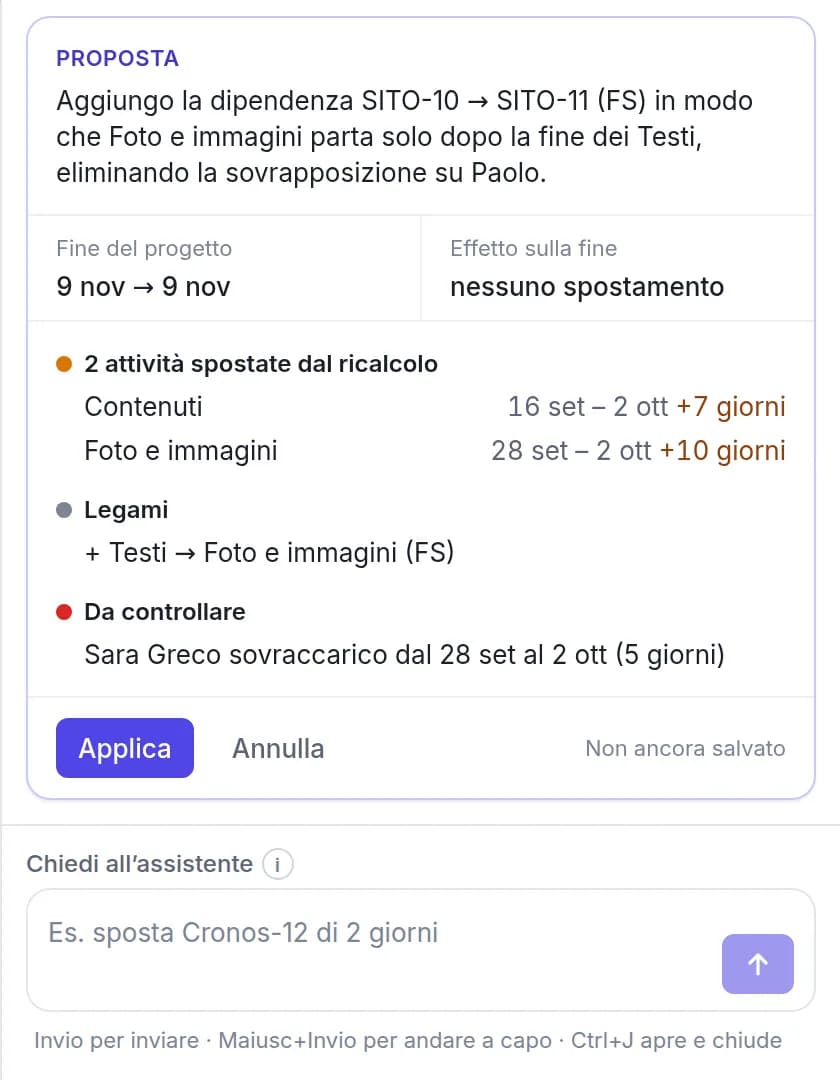
It is available on every page of the app and uses the open project as context. Its answers are based on your plan’s data, not on generic advice.
- Questions on progress, delays, workload and the forecast finish date
- Changes in plain language (“move SITE-12 by two days”), with a preview and confirmation before they are applied
- A full plan from a description: phases, tasks, links and milestones, with dates computed by the engine
Scheduling
A complete scheduling engine
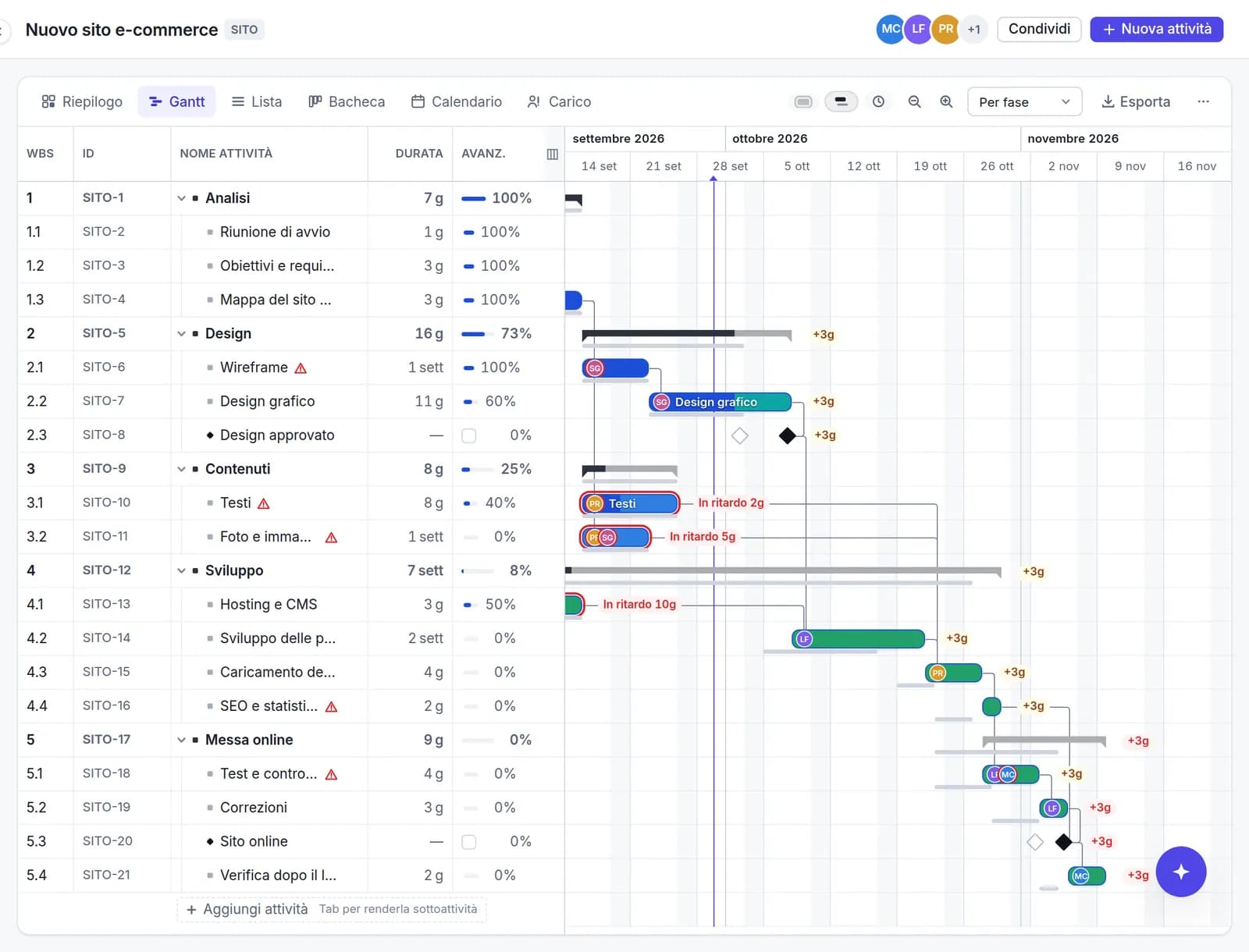
Dates come from links, constraints and calendars. Change a duration and the engine recalculates everything else, the way Microsoft Project does.
- Finish-to-start, start-to-start, finish-to-finish and start-to-finish links, with lead and lag
- Constraints (“start no earlier than”), deadlines and manually scheduled tasks
- Calendars with working weeks, public holidays and exceptions
Views
Six views of the same plan
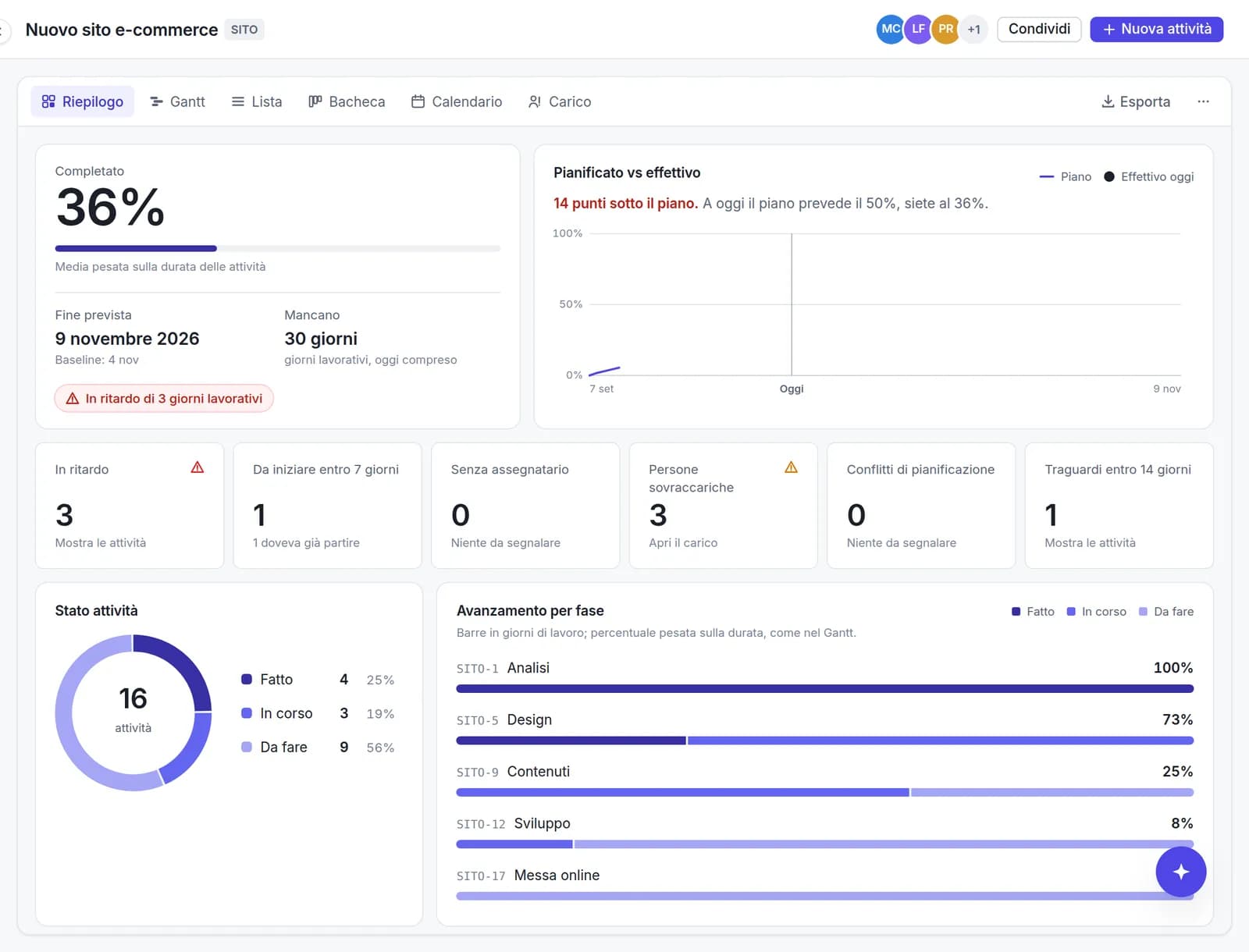
Each view has its own URL, so a link reopens exactly that view. The data remains consistent across views.
- Summary: completion, planned versus actual, delays and upcoming deadlines
- Gantt and List with multi-select, copy and paste to and from Excel
- Kanban board by status, and a Calendar
Team
Team collaboration with no per-seat fees
Each task has a panel with its details, comments and change history. Viewers are free of charge.
- Invitations by link, with roles: owner, editor, viewer
- Comments with @mentions and per-task change history
- Jira-style task keys (SITE-12) and direct links to every task

- interface languages
- 10
- project formats you can import
- 6
- per seat: the whole team joins at no cost
- €0
Capabilities
A complete scheduling engine, not just bars on a board
Planitude schedules the way Microsoft Project does: dates are calculated from dependencies, calendars and constraints, not set by dragging bars. Every other feature is built on that foundation.
- 01
AI assistant
Answers questions about progress and deadlines, proposes changes with a preview and drafts a plan from a description.
- 02
Import and export
.mpp, .mpt, .mpx, Project XML and Primavera .xer: tasks, links, constraints, calendars and baselines are imported, and resources are listed in the task notes. Export to Microsoft Project XML, CSV or PDF.
- 03
Gantt chart with true scheduling
Four dependency types with lead and lag, constraints, deadlines, multi-level subtasks, milestones and the critical path.
- 04
Baselines and delays
Baseline saved automatically at the first progress update, baseline bars, slippage in days and tasks moved since your last visit.
- 06
People and workload
Assign several people to a task, check day by day who is over-allocated and resolve conflicts where they matter.
- 07
Teamwork
Invitations with roles, comments with @mentions, change history and a read-only public link. No per-seat fees.
- 08
12 ready-made templates
Website, product launch, event, office move, thesis and more, with phases and links already set up. Save your own projects as templates.
- 09
Connect your AI tools
MCP server and API keys: Claude Code, Codex, Gemini CLI, Cursor and VS Code can read and update your plans.
Migration
Migrating from Project Online after September 30, 2026
Microsoft retired Project Online on September 30, 2026. If you still have your .mpp files, or an XML file saved from Project Professional, your plans are not lost: Planitude opens them with dependencies, calendars and baselines.
Gather your project files
Collect the .mpp copies saved before the retirement, or the XML files exported from Project Professional: they are the starting point for the migration.
Import into Planitude
Drag the file into Planitude: tasks, hierarchy, durations, links, constraints, calendars, baselines and actuals are imported. The file’s resources are listed in each task’s notes, so you can assign the work to project members. A preview and a report list anything that could not be mapped.
Verify the schedule and continue
Compare the critical path and finish date with the original plan, invite your team and continue scheduling. You can export to Microsoft Project XML at any time.
Frequently asked questions
Is Planitude free of charge?
Yes. Scheduling, import and export, the AI assistant and unlimited collaborators are free, with no credit card required. The service is funded by advertising, which is always displayed outside the planning area. If a paid plan is introduced, your existing projects will remain yours and fully accessible.
Does Planitude open Microsoft Project files?
Yes: Microsoft Project .mpp files and .mpt templates, .mpx, Project XML (MSPDI), and Primavera .xer and PMXML. The import report lists every field that could not be mapped, so nothing is discarded silently.
Can I take my plans back to Microsoft Project?
Yes. Every project can be exported to Microsoft Project XML (readable by Project Professional and by other tools that support the format) or to CSV for Excel, and printed to PDF. Your data is never locked in.
What does the AI assistant do?
It reads the open project and answers questions such as “Will we finish on time?” or “Who is over-allocated?”. It can also change the plan (move, add or reassign tasks): it always shows a preview first and applies changes only after you confirm. From a written description, it builds a complete plan with phases, tasks and links.
How do I work with my team and with clients?
Invite people with a link and choose their role: owner, editor or viewer. Team members comment on tasks and mention colleagues with @. People without an account can receive a read-only public link, which you can revoke at any time.
Can I connect Planitude to Claude Code, Codex or Cursor?
Yes, through the MCP server and an API key created in your profile: it works with Claude Code, Codex, Gemini CLI, Cursor, VS Code and the OpenAI API. The ChatGPT and Gemini web apps need an OAuth sign-in that is not available yet.
What happened to Project Online on 30 September 2026?
Microsoft retired the service with no extension and no read-only period, and its data is no longer accessible. If you exported an .mpp or XML copy beforehand, import it into Planitude and continue from there.
Do I have to install anything?
No. Planitude is a web application: no desktop client, no plug-in and no administrator rights are required.
Where is my data stored?
On servers in the European Union (Germany). The project owner can permanently delete a project at any time. When you use the AI assistant, the text needed to answer your question is sent to the model provider.
Move your plans off Project Online
Create a workspace, import your .mpp file and review the Gantt chart. It takes two minutes and requires no licence.